Queries and visualizations to help people use data
Submitted by megan on July 21, 2016 - 2:01pm
With the FLOSSmole Apache Project/Contributor/Roles data we updated earlier today, we thought an interesting initial analysis would be to figure out how various corporations populate the Apache projects (at least according to the official lists of contributors posted on each Apache project page).
Here is a list of the Apache projects with the highest density of participation by a single corporation:
Submitted by gbatchelor on July 1, 2016 - 10:31am
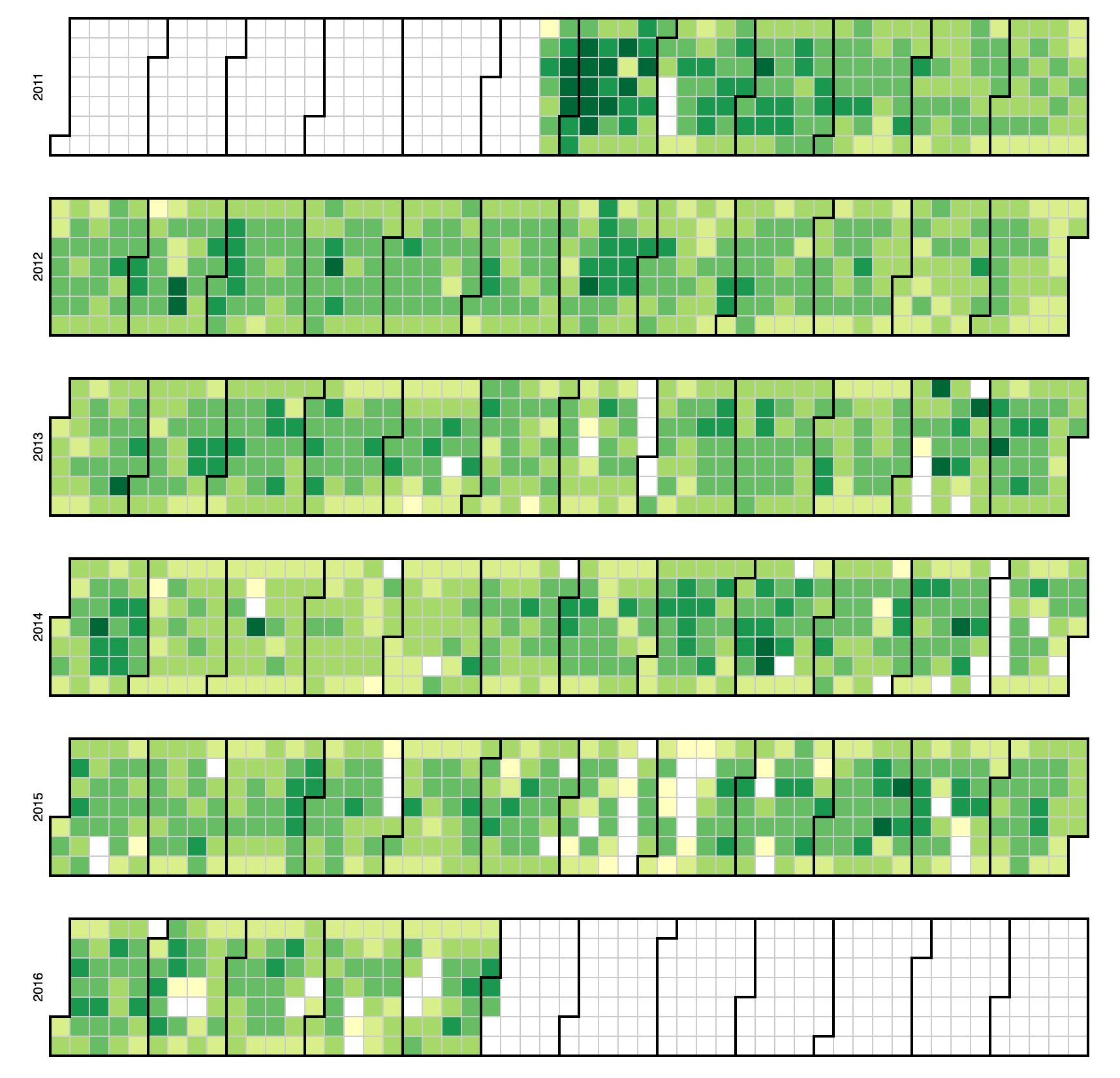
Django IRC D3 CONTRIBUTIONS GRAPH
This graph represents The number of posts in the Django IRC logs. The lighter green squares represent days with less posts than the darker green squares. Months go from left to right and are separated by the darker lines. Days go by columns from left to right.
Submitted by gbatchelor on June 29, 2016 - 11:41am
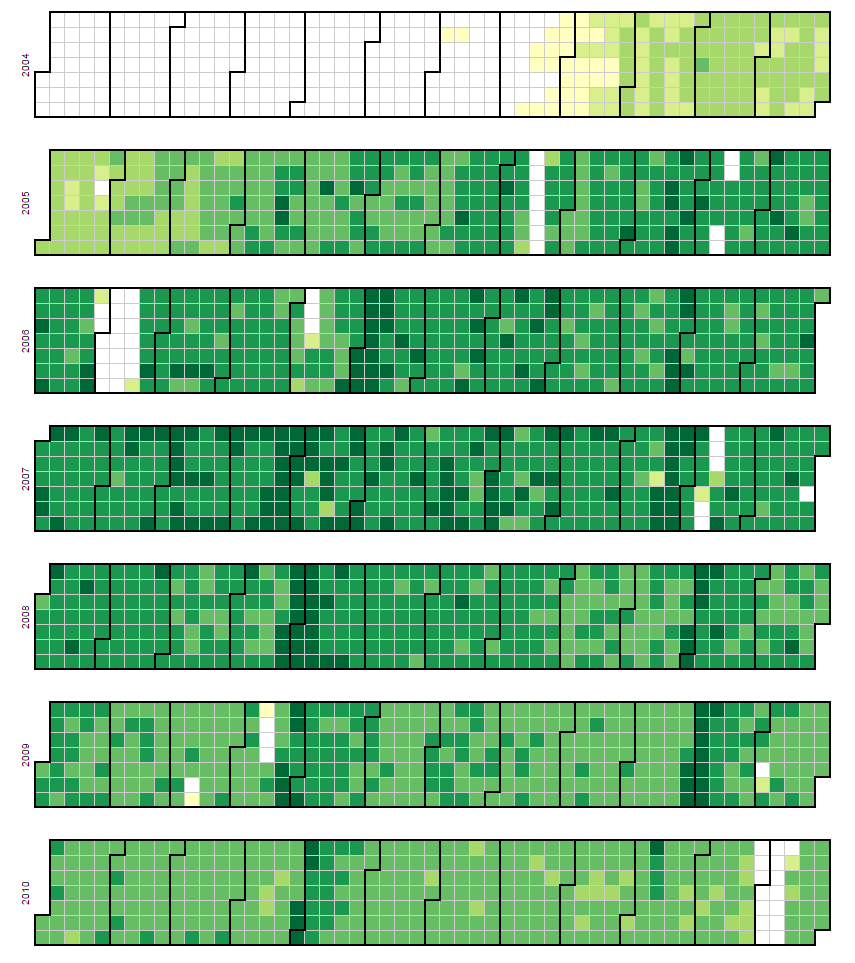
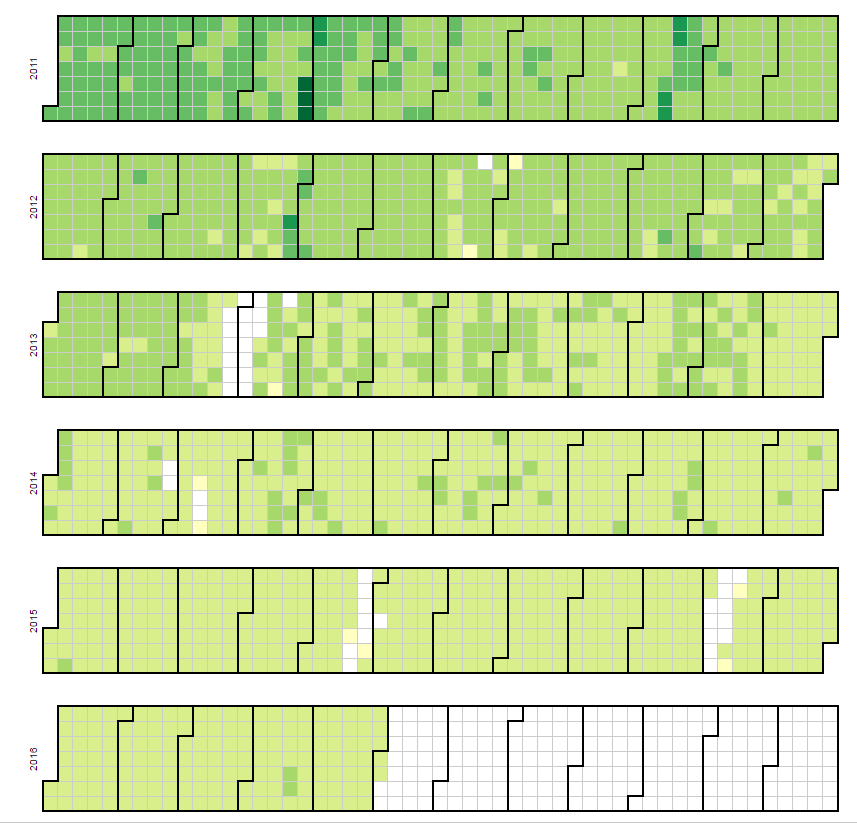
Ubuntu IRC D3 CONTRIBUTIONS GRAPH
This graph represents The number of posts in the UbuntuIRC logs. The lighter green squares represent days with less posts than the darker green squares. Months go from left to right and are separated by the darker lines. Days go by columns from left to right.
Submitted by gbatchelor on June 28, 2016 - 9:36am
The following are a few examples of some quick queries and visualizations we made to show how to use the Perl6 IRC data.
(1) Posts by hour of day over the years

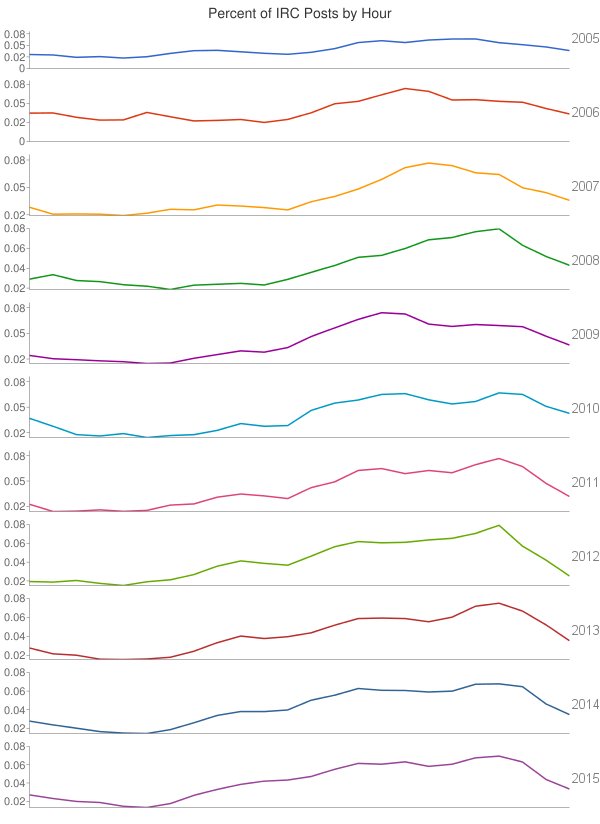
SQL code:
SELECT YEAR(`date_of_entry`),HOUR(`time_of_entry`),COUNT(HOUR(`time_of_entry`))
FROM `perl6_irc`
GROUP BY 1,2
(2) Perl6 IRC Posts by hour
Submitted by gbatchelor on June 23, 2016 - 12:27pm
Here are some graphs and SQL to show how to use the Bitcoin IRC data. These charts track the activity of three main developers of Bitcoin: Mike Hearn, Gregory Maxwell, and Gavin Andresen. These three developers were featured in a New York Times article about Bitcoin developers.
(1) Bitcoin Developers IRC Posts Over Time
Submitted by gbatchelor on June 23, 2016 - 9:55am
BITCOIN IRC D3 CONTRIBUTIONS GRAPH
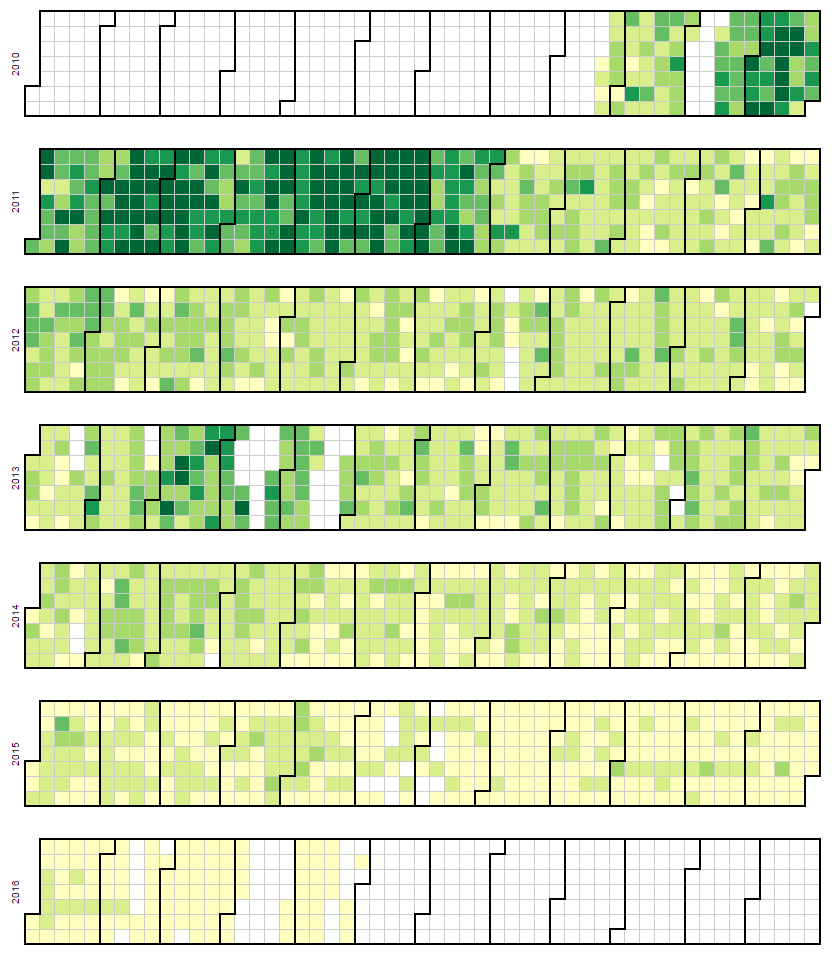
This graph represents The number of posts in the Bitcoin IRC logs. The lighter green squares represent days with less posts than the darker green squares. Months go from left to right and are separated by the darker lines. Days go by columns from left to right.
Submitted by Anonymous on June 2, 2014 - 5:33pm
Description:
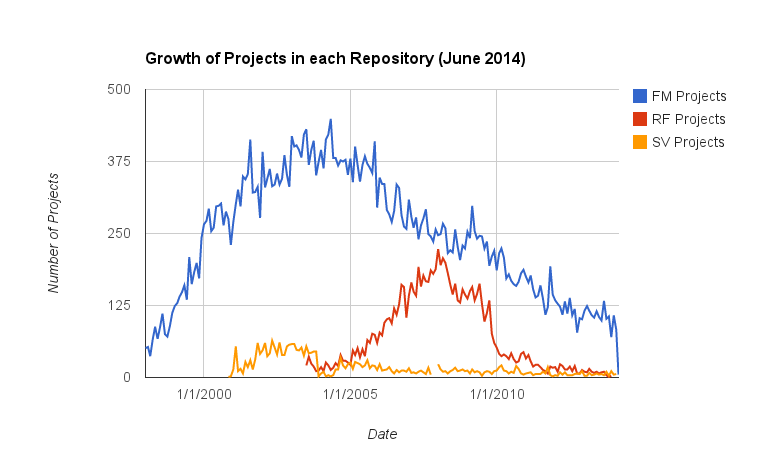
This chart shows the number of NEW projects added to each repository by month/year.
Visualization:
Notes: RF had ~750 projects without a project start date.
SQL Script:
SELECT MONTH( date_added ) , YEAR( date_added ) , COUNT( DISTINCT project_id )
FROM fm_projects
WHERE datasource_id = [current]
GROUP BY YEAR( date_added ) , MONTH( date_added )
ORDER BY YEAR( date_added ) , MONTH( date_added );
Submitted by Anonymous on June 2, 2014 - 5:05pm
Description:
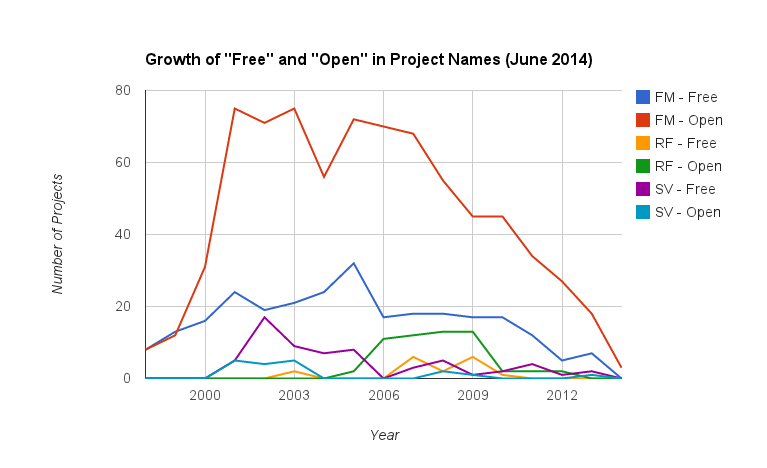
This chart shows the number of new projects in each repository that use the words "Free" and "Open" in project names through 2014.
Visualization:
SQL Script:
Freshmeat:
SELECT YEAR( date_added ) , COUNT( DISTINCT project_id ) AS Count
FROM fm_projects
WHERE projectname_full LIKE "%free%"
AND datasource_id = [current]
GROUP BY YEAR( date_added )
ORDER BY YEAR( date_added );
Submitted by Anonymous on June 2, 2014 - 4:48pm
Description:
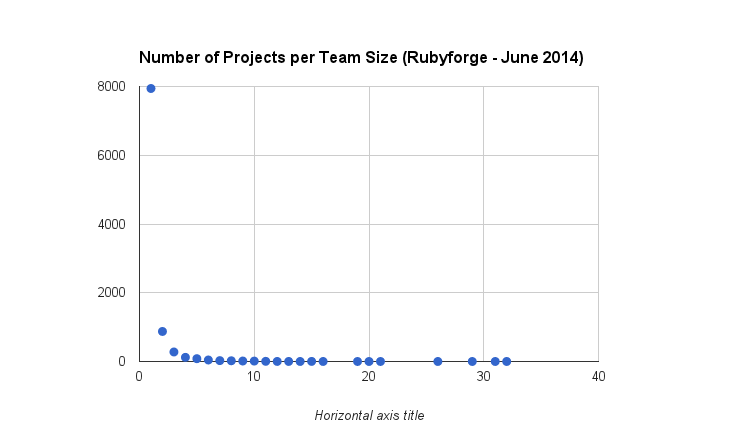
This chart show the number of projects for each team size in Rubyforge.
Visualization:
Projects listed as having 0 developers were disregarded (159 projects).
SQL Script:
SELECT DISTINCT dev_count, COUNT( DISTINCT proj_unixname ) AS count
FROM rf_projects
WHERE datasource_id = [current]
GROUP BY dev_count
ORDER BY count DESC , dev_count
Submitted by Anonymous on June 2, 2014 - 4:31pm
Description:
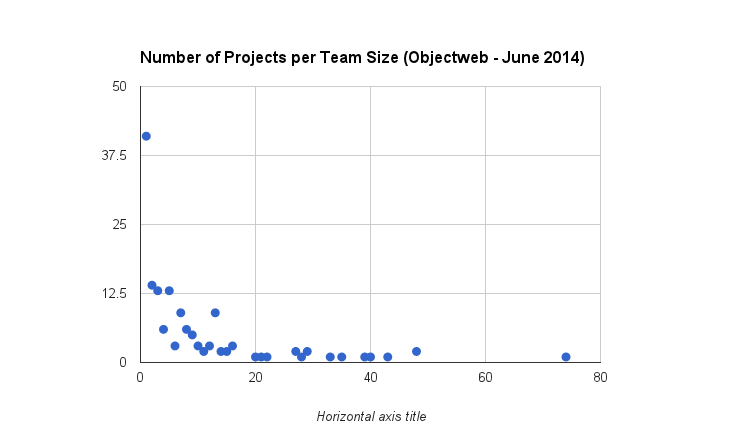
This chart shows the number of projects of each team size listed in Objectweb.
Visualization:
SQL Script:
SELECT DISTINCT dev_count, COUNT( DISTINCT proj_unixname ) AS count
FROM ow_projects
WHERE datasource_id = [current]
GROUP BY dev_count
ORDER BY count DESC , dev_count
Pages
